
Rena's changes look like your own editor
When Rena proposes a change to your practice code, it now shows in your editor's own colors, and each block can be kept or undone by itself. You can edit a sent message in place, math reads as math, and code names in her replies jump to that spot in your code.
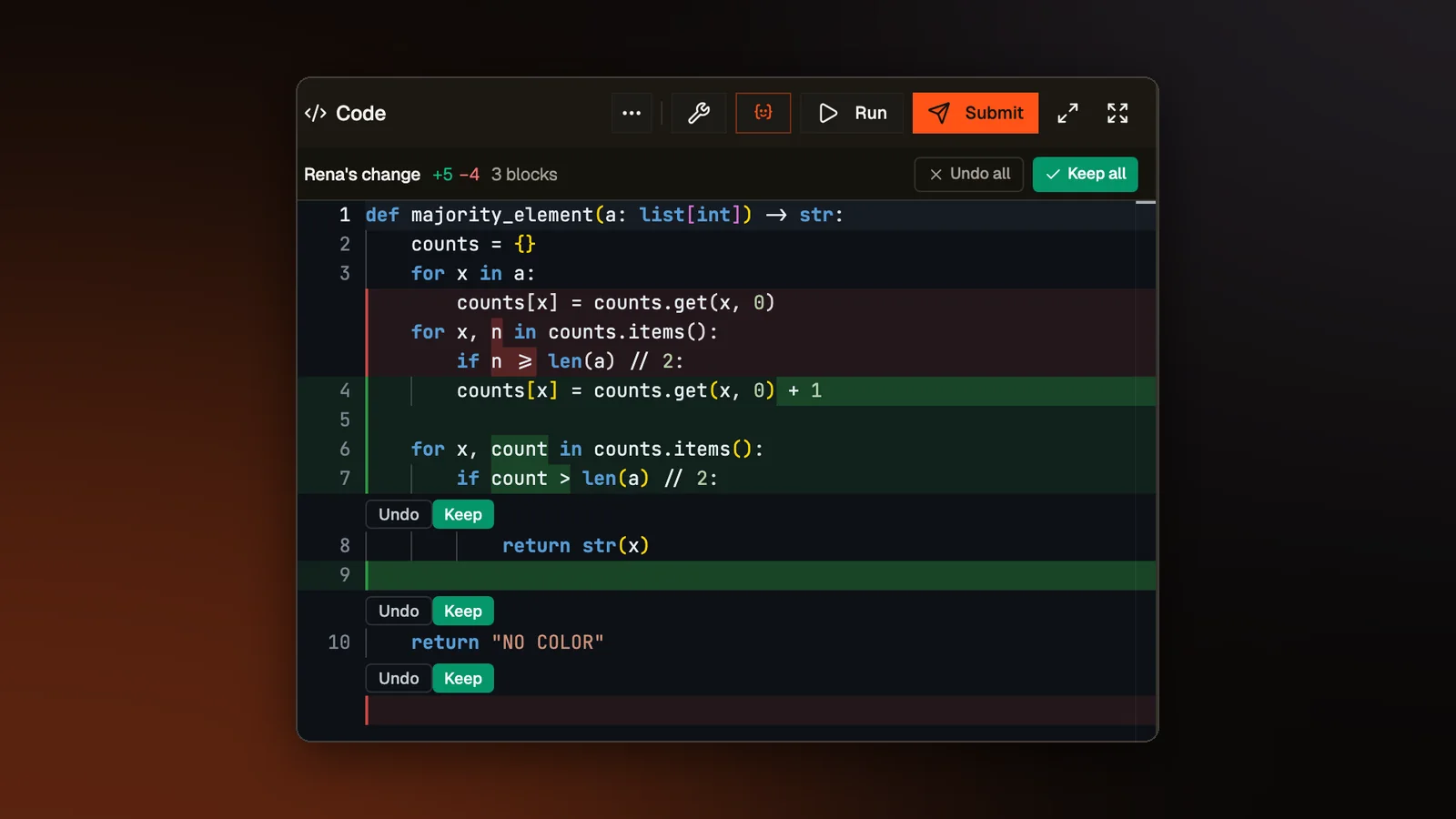
Rena is our AI tutor, and on practice problems she sits beside the code editor. She can propose a change to your code, which you then keep or throw away. This post covers how her proposals, your messages to her and her replies now work.
A proposed change in your editor's colors
A proposed change used to open in a stock diff viewer. It had its own colors, a second column of line numbers, plus and minus marks, and solid red and green blocks, so even the lines that did not change looked different from your code. The proposal now keeps the practice editor's look, with the same theme, font and single column of line numbers. Only the changed lines are tinted. A slim bar above the code shows how many lines were added and removed.
Keep or undo each block
A change with two or more separate blocks now has Keep and Undo buttons under each block, as code editors such as VS Code have. The bar's buttons become Keep all and Undo all. Undo all drops only the blocks you have not decided on yet, so blocks you already kept stay in. Only the kept blocks go into your code. The card in the chat uses the same words and reads Kept or Undone once you choose.
Editing a message you sent
The pencil on a message you sent used to copy its text into the box at the bottom, and sending made a new message under the old one. Now the message itself turns into a text box with Cancel and Send. Sending replaces that message and everything after it, so the conversation goes on from your edit. Enter sends, Shift+Enter adds a line and Escape cancels. An edited message keeps its images. This works in the full tutor on practice problems and in the version of Rena that gives only hints, in practice and in classes.
Math reads as math
Rena sometimes writes math in the notation used to typeset papers, which wraps a formula such as 10^9 in backslashes and brackets. The chat used to print that notation as it was. It now shows the symbols the notation stands for, so 10^9 reads as 10 with a raised 9 and a big O formula reads as one. Prices and code are left alone.
Problem statements got the same treatment. Plain text math such as a_i or 10^9 now shows as a with a small i below it, or 10 with a raised 9. Names such as max_value, code and sample input stay as written. In a problem about XOR, a^b also stays as written, since there it means XOR. Across the library, about three statements in four changed.
Code names that point at your code
When one of Rena's replies puts a name from your code in code formatting, such as a function or a variable, the name is now a link. Clicking it selects that spot in your editor, scrolls to it and lights up the line. Clicking again goes to the next place the name is used. Words every program has, such as int or return, get no link. Neither does a line number, since the code Rena reads has none.
Room for Rena
Dragging Rena's panel wider used to squeeze the code editor until its lines wrapped every few words. The editor now keeps its width and slides under Rena, and once you let go it hides behind a slim Code strip. Dragging further narrows the problem description, so Rena keeps growing.
The Ask Rena button above the editor also puts the cursor in her message box, so you can start typing right after you click it. It used to only open her panel, so nothing changed on screen when the panel was already open.
Try it on a real problem
Write code, run it against the tests, and see what passes. No account needed.