
See what each student handed in
Teachers can now open any student's work on an assignment, with a result for every test, earlier hand-ins, the student's AI chat and a place to comment. Grades and submissions each download in one click.
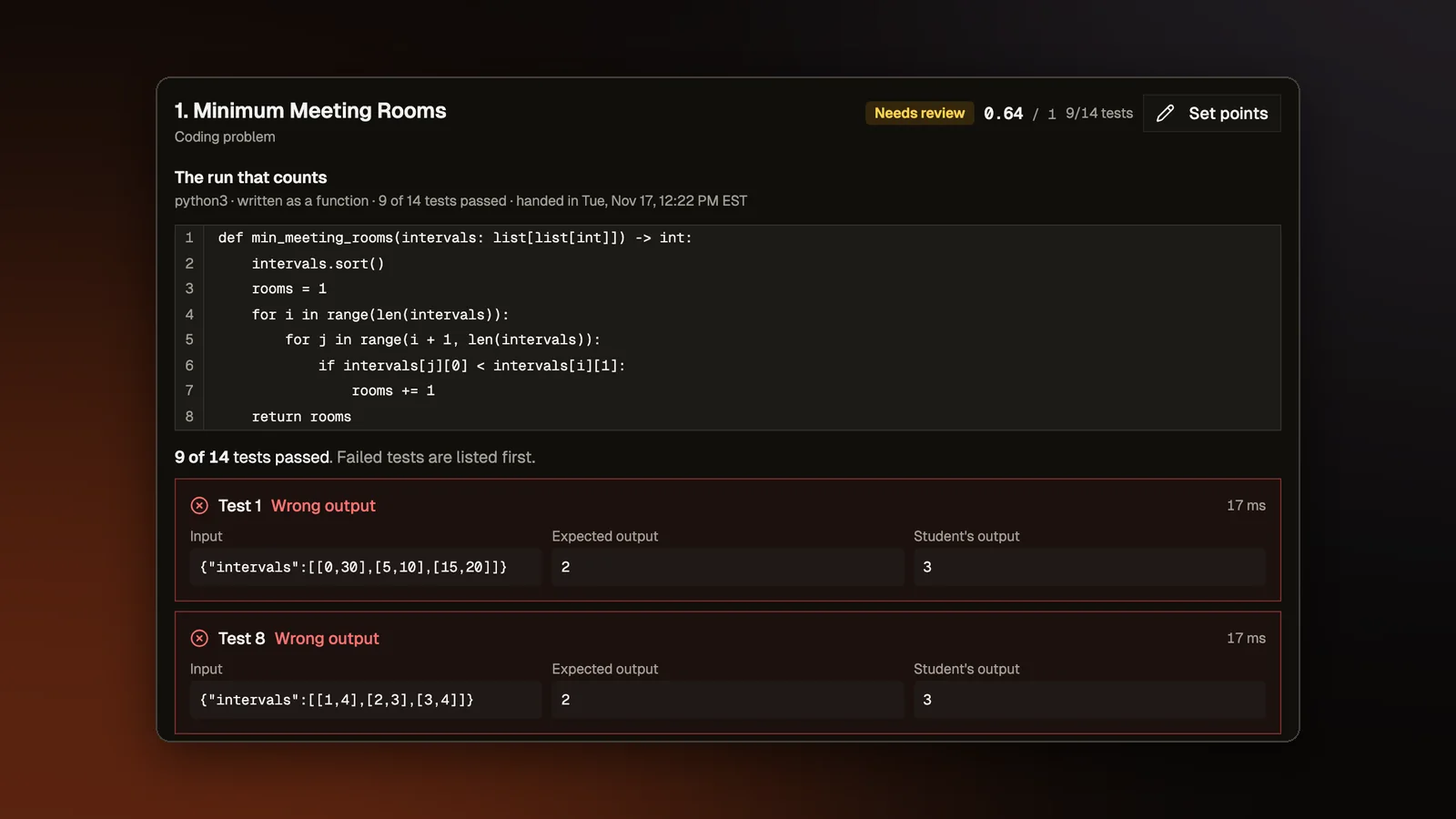
Before this change, a teacher looking at a coding assignment saw a score such as 1 of 3 for each student and little else. Only a student's best and latest runs were kept. Looking at one student's work meant opening a popup for each problem. Teachers now get a record of every test on every hand-in and a page for each student.
A result for every test
Each hand-in of code is now kept with one of five results for each test: passed, wrong output, timed out, crashed or did not compile. For a failed test, the teacher also sees the input, the expected output, what the student's code printed and any error. A student's earlier hand-ins are kept as well, and the one the grade comes from is never dropped.
The teacher sees a box for each test, with failed tests first and hidden tests marked, and the code shows with line numbers. A student sees a box for each test they could already see and a count for the hidden ones. Our server never sends a hidden test's input or expected output to a student.
A page for each student
Every name on Manage submissions, Grade submissions and Review grades now opens a page for that student. It lists each problem with its score, the code, the tests, the earlier hand-ins, the student's AI chat and any review notes, and it has a way to set points by hand. Previous student and Next student move through the class, as do the arrow keys. A student who has not opened the assignment gets a page too.
A teacher can write a comment on one problem or on the whole assignment. The student gets one notice about it and sees it on their Grades tab and on the problem page. A comment saves when the teacher clicks away, presses Cmd+Enter or moves to the next student.
The student's AI chat opens in a panel down the right edge, drawn the way the student saw it. It used to open in a box over the grade list. The list now stays beside the panel and can still be clicked, so the next student's chat opens in the same place.
Finding the work that needs a look
Manage submissions now has search, columns that sort, and filters for All, Not started, Late and Needs review. Students who never opened the assignment appear as rows, so the Not started filter finds them. In the roster, solved problems show how late they were handed in, and a mark shows which students have an extension.
Downloads
Review grades has two downloads. Download grades saves a file that opens in a spreadsheet, with a column for each problem and what it is out of, how late each hand-in was, times in the teacher's time zone and the feedback. Download submissions saves a zip file with a folder for each student and a file for each problem. The class Grades page has Download class grades. The old Export Evaluations button is gone.
One answer per quiz problem
A quiz problem inside an assignment now takes only the first answer each student gives. A student used to be able to answer wrong, see the right option, reload the page and answer again for full credit, while the teacher saw only a green check. Our server now refuses a second answer, and it sends the right option to the browser only after an answer is on record. After a reload, the page stays locked and shows the answer the student gave.
Who can read it
Only the assignment's teacher can read another student's code, tests, earlier hand-ins or feedback. Our privacy page describes the hand-ins we keep and the comments.
Open a sample class
A class as its teacher sees it, with assignments, students and grades. No account needed.